# Concepts
Before diving deep into Streaming SQL concepts, let's delve into the concepts and requirements.
### Requirements
#### Permissions
Permissions required:
* To view an SQL Processor:
* Application permission: at least `View` level of the `SQL Processors`
* Data Namespaces permissions: at least `Show Topic` for each input and output topic
* To manage an SQL Processor lifecycle (start, stop, scale, and delete):
* Application permission: at least `Manage` level of the `SQL Processors`
* Data Namespaces permissions: at least `Show Topic` for each input and output topic
* To create a new SQL Processor:
* Application permission: at least `Manage` level of the `SQL Processors`
* Data Namespaces permissions: at least `Query Topic` for each input topic
* Data Namespaces permissions: at least `Insert Data` for each output topic
#### Schemas must be available for Structured Data
To support features like:
* Inference of output schemas
* Creation-time validation of input query
* Selections
* Expressions
### Lenses SQL Engine
Lenses SQL Engine Streaming mode needs up-to-date schema information for all structured topics used as input in a given query. In this context, *structured* means topics that use complex storage formats like `AVRO` or `JSON`.
```sql
INSERT INTO daily-item-purchases-stats
SELECT STREAM
itemId
, COUNT(*) as dailyPurchases
, AVG(price / quantity) as average_per_unit
FROM purchases
WINDOW BY TUMBLE 1d
GROUP BY itemId;
```
For the above query, for example, the `purchases` topic will need to have a *value* set to a structured format, and a valid schema will need to have already been configured in Lenses. In such schema, fields `itemId`, `price` and `quantity` must be defined, the latter two being of a numerical type.
These requirements ensure the Engine will always in a position to know what kind of data it will be working with, guaranteeing at the same time that all obvious errors are caught before a query is submitted.
Lenses SQL Streaming mode processes data as an independent sequence of infinite events. This is what Stream Processing means.
An *Event* in this context is a *datum* of information, the smallest element of information that the underlying system uses to communicate. In Kafka’s case, this is a Kafka record/message.
Two parts of the Kafka record are relevant:
* **Key**
* **Value**
These are referred to as **facets** by the engine.
These two components can hold any data, and Kafka is agnostic on the actual Storage Format for either of these two fields. More information about Storage Formats.
Lenses SQL Streaming interprets records as (key, value) pairs, exposing several ways to manipulate these pairs.
See Projections, Aggregations, and Joins to know more about the role of the Key and the Value in the context of these features.
### Expressions in Lenses SQL
An *expression* is any part of a Lenses SQL query that can be evaluated to a concrete value (not to be confused with a record value).
In a query like the following:
```sql
INSERT INTO target-topic
SELECT STREAM
CONCAT('a', 'b') AS result1
, (1 + field1) AS result2
, field2 AS result3
, CASE
WHEN field3 = 'Robert' THEN 'It's bobby'
WHEN field3 = 'William' THEN 'It's willy'
ELSE 'Unknown'
END AS who_is_it
FROM input-topic
WHERE LENGTH(field2) > 5;
```
`CONCAT('a', 'b')`, `(1 + field1)` and `field2` are all expressions whose values will be `_projected_` onto the output topic, whereas `LENGTH(field2) > 5` those whose values will be used to filter out input records.
Expressions can be built by composing basic ones using our pre-defined or user-defined functions.
### Lenses SQL Streaming and Kafka Streams
Lenses SQL engine Stream modes are built on top of Kafka Streams, and it enriches this tool with an implementation of Lenses SQL that fits well with the architecture and design of Kafka Streams.
What this means in practice is that an SQL Processor, when executed, will run a Kafka Streams instance, which will be this instance that communicates with Kafka via consumer group semantics.
Each SQL Processor has an *application id* that uniquely identifies it within Lenses. The application id is the Kafka Streams application id, which becomes the underlying Kafka Consumer(s) group identifier.
Scaling up or down the number of runners automatically adapts and rebalances the underlying Kafka Streams application inline with the Kafka group semantics.
The advantages of using Kafka Streams as the underlying technology for SQL Processors are several:
* Kafka Streams is an enterprise-ready, widely adopted, and understood technology that integrates natively with Kafka
* Using consumer group semantics allows leveraging Kafka’s distribution of workload, fault tolerance, and replication out of the box
### Data as a flow of events: Streams
A stream is probably the most fundamental abstraction that Lenses SQL Streaming provides, and it represents an unbounded sequence of independent events over a continuously changing dataset.
Let’s clarify the key terms in the above definition:
* event: an event, as explained earlier, is a datum that is a (key, value) pair. In Kafka, it is a record.
* continuously changing dataset: the totality of all data described by every event received. As such, it is changed every time a new event is received.
* unbounded: this means that the number of events changing the dataset is unknown, and it could even be infinite
* independent: events don’t relate to each other and, in a stream, they are to be considered in isolation
The above should make clear that a stream is a very fitting abstraction for a Kafka topic, as they both share the above points.
The main implication is that stream transformations (e.g., operations that preserve the stream semantics) are stateless because the only thing they need to consider is the single event being transformed. Most Projections fall within this category.
#### Stream Example
To illustrate the meaning of the above definition, imagine that the following two events are received by a stream:
```bash
("key1", 10)
("key1", 20)
```
Now, if the desired operation on this stream was to sum the values of all events with the same *key* (this is called an Aggregation), the result for `"key1"` would be `30`, because each event is taken in isolation.
Finally, compare this behavior with that of tables, as explained below, to understand how these two abstractions are related but different.
#### Stream syntax
Lenses SQL streaming supports reading a data source (e.g., a Kafka topic) into a stream by using `SELECT STREAM`.
```sql
SELECT STREAM *
FROM input-topic;
```
The above example will create a stream that will emit an event for each and every record `input-topic`, including future ones. See more details about SQL projection and the specific `*` syntax.
### Data as a snapshot of the state of the world: Tables
While a stream is useful for visibility to every change in a dataset, sometimes it is necessary to hold a snapshot of the most current state of the dataset at any given time.
This is a familiar use-case for a database, and the Streaming abstraction for this is aptly called the table.
For each key, a table holds the latest version received of its value, which means that upon receiving events for keys that already have an associated value, such values will be overridden.
A table is sometimes referred to as a changelog stream to highlight that each event in the stream is interpreted as an update.
Given its nature, a table is intrinsically a stateful construct because it needs to keep track of what it has already been seen. The main implication is that table transformations will consequently also be stateful, which in this context means that they will require local storage and data being copied.
Additionally, tables support delete semantics. An input event with a given key and a `null` value will be interpreted as a signal to delete the (key, value) pair from the table.
Finally, a table needs the key for all the input events **not to be `null`**. To avoid issues, tables will *ignore and discard* input events that have a `null` key.
#### Table example
To illustrate the meaning of the above definition, imagine that the following two events are received by a *table*:
```properties
("key1", 10)
("key1", 20)
```
Now, if the desired operation on this table was to sum the values of all events with the same key (this is called an Aggregation), the result for `key1` would be `20`, because `(key1, 20)` is interpreted as an update.
Finally, compare this behavior with that of streams, as explained above, to understand how these two abstractions are related but different.
#### Table syntax
Lenses SQL Streaming supports reading a data source (e.g., a Kafka topic) into a table by using `SELECT TABLE`.
```sql
SELECT TABLE *
FROM input-topic;
```
The above example will create a *table* that will treat each event on `input-topic`, including future ones, as updates. See wildcard projections for more details about specific `*` syntax.
#### Tables and compacted topics
Given the semantics of tables, and the mechanics of how Kafka stores data, the Lenses SQL Streaming will set the `cleanup.policy` the setting of every new topic that is created from a table to `compact`, unless explicitly specified otherwise.
This means that the data on the topic will be stored with a semantic more closely aligned to that of a *table* (in fact, tables in Kafka Streams use compacted topics internally). For further information regarding the implications of this, it is advisable to read the official Kafka Documentation about `cleanup.policy`.
### The duality between streams and tables
Streams and tables have significantly different semantics and use cases, but one interesting observation is that are strongly related nonetheless.
This relationship is known as *stream-table duality*. It is described by the fact that every stream can be interpreted as a table, and similarly, a table can be interpreted as a stream.
* Stream as Table: A stream can be seen as the changelog of a table. Each event in the stream represents a state change in the table. As such, a table can always be reconstructed by replaying all stream events in order.
* Table as Stream: A table can be seen as a snapshot, at a point in time, of the latest value received for each key in a stream. As such, a stream can be reconstructed by iterating over each (Key, Value) pair and emitting it as an event.
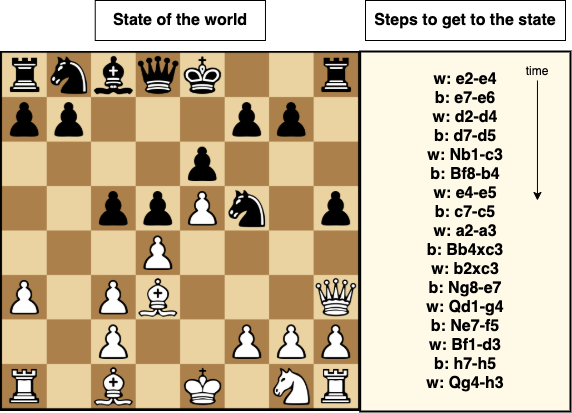
Let’s use a chess game as an example to clarify the duality above.
A chessboard is shown at a specific time during a game on the left-hand side of the above image. This can be seen as a table where the key is a given piece, and the value is its position. Also, on the right-hand side, the list of moves culminating in the positioning described on the left; it should be obvious that this can be seen as a stream of events.
The idea formalized by the stream-table duality is that, as it should be clear from the above picture, we can always build a table from a stream (by applying all moves in order).
It is also always possible to build a stream from a table. In the case of the chess example, a stream could be made where each element represents the current state of a single piece (e.g., w: Q h3).
This duality is very important because it is actively used by Kafka (as well as several other storage technologies), for example, to replicate data and data stores and to guarantee fault tolerance. It also translates table and stream nodes within different parts of a query.
### Lenses SQL Streaming and schemas: a proactive approach
One of the main goals of Lenses SQL Streaming mode is to ensure that it uses all the information available when a SQL Processor is created to catch problems, suggest improvements, and prevent errors. It’s more efficient and less frustrating to have an issue coming up during registration rather than at some unpredictable moment in the future, at runtime, possibly generating corrupted data.
SQL engine will actively check the following during the registration of a processor:
* Validation of all user inputs
* Query lexical correctness
* Query semantics correctness
* Existence of the input topics used within the query
* User permissions in relation to all input and output topics
* Schema alignment between fields and topics used within the query
* Format alignment between data written and output topics, if the latter already exist
When all the above checks pass, the Engine will:
* Generate a SQL Processor able to execute the user’s query
* Generate and save valid schemas for all output topics to be created
* Monitor the processor and make such metrics available to Lenses
The Engine takes a principled and opinionated approach to schemas and typing information; what this means is that, for example, where there is no schema information for a given topic, that topic’s fields will not be available to the Engine, even if they are present in the data; also, if a field in a topic is a `string`, it will not be possible to use it as a number, for example, without explicitly `CAST`ing it.
The Engine’s approach supports naming and reusing parts of a query multiple times. This can be achieved using the dedicated statement `WITH`.
```sql
SET defaults.topic.autocreate=true;
SET commit.interval.ms='1000';
SET enable.auto.commit=false;
SET auto.offset.reset='earliest';
WITH countriesStream AS (
SELECT STREAM *
FROM countries
);
WITH merchantsStream AS (
SELECT STREAM *
FROM merchants
);
WITH merchantsWithCountryInfoStream AS (
SELECT STREAM
m._key AS l_key
, CONCAT(surname, ', ', name) AS fullname
, address.country
, language
, platform
FROM merchantsStream AS m
JOIN countriesStream AS c
ON m.address.country = c._key
WITHIN 1h
);
WITH merchantsCorrectKey AS(
SELECT STREAM
l_key AS _key
, fullname
, country
, language
, platform
FROM merchantsWithCountryInfoStream
);
INSERT INTO currentMerchants
SELECT STREAM *
FROM merchantsCorrectKey;
INSERT INTO merchantsPerPlatform
SELECT TABLE
COUNT(*) AS merchants
FROM merchantsCorrectKey
GROUP BY platform;
```
The `WITH`s allow for whole sections of the query to be reused and manipulated independently by successive statements, and all this is done by maintaining schema and format alignment and correctness. The reason why this is useful is that it allows to specify queries that split their processing flow without having to redefine parts of the topology. This, in turn, means that less data needs to be read and written to Kafka, improving performance.
This is an example of what the Lenses SQL Engine Streaming can offer because of the design choices and strict rules implemented at query registration.