# SQL Processor
### Concept
Stream Processing is fully supported by Lenses SQL engine **Streaming** mode.
**SQL Processors** offer:
* A *no-code*, stand-alone application executing a given Lenses SQL query on current and future data
* Query graph visualization
* Fully integrated experience within Lenses
* ACLs and Monitoring functionality out-of-the-box
* Ability to scale up and down workflows via Kubernetes
Streaming queries read from Kafka topics, select and calculate new fields on the fly, aggregate data based on specific fields and windows, and write the output to the desired Kafka topics. They run the query continuously.
### Getting started
#### What queries look like
Below are two Lenses SQL queries that will be used as examples for the rest of this section.
Here is the first query:
```sql
SET defaults.topic.autocreate=true;
INSERT INTO daily-item-purchases-stats
SELECT STREAM
itemId
, COUNT(*) AS dailyPurchases
, AVG(price / quantity) AS average_per_unit
FROM purchases
WINDOW BY TUMBLE 1d
GROUP BY itemId;
```
Here is the second one:
```sql
SET defaults.topic.autocreate=true;
SET commit.interval.ms='1000';
SET enable.auto.commit=false;
SET auto.offset.reset='earliest';
WITH countriesStream AS (
SELECT STREAM *
FROM countries
);
WITH merchantsStream AS (
SELECT STREAM *
FROM merchants
);
WITH merchantsWithCountryInfoStream AS (
SELECT STREAM
m._key AS l_key
, CONCAT(surname, ', ', name) AS fullname
, address.country
, language
, platform
FROM merchantsStream AS m JOIN countriesStream AS c
ON m.address.country = c._key
WITHIN 1h
);
WITH merchantsCorrectKey AS(
SELECT STREAM
l_key AS _key
, fullname
, country
, language
, platform
FROM merchantsWithCountryInfoStream
);
INSERT INTO currentMerchants
SELECT STREAM *
FROM merchantsCorrectKey;
INSERT INTO merchantsPerPlatform
SELECT TABLE
COUNT(*) AS merchants
FROM merchantsCorrectKey
GROUP BY platform;
```
Details about the features used in the above queries can be found in Stream, Table, Projections, and Aggregations.
Lenses SQL Streaming mode allows for streaming queries that read from Kafka topics (e.g. `merchants` and `purchases`), select and calculate new fields on the fly (e.g. `fullname`, `address.country` and `platform`), aggregate data based on specific fields and windows, and finally write the output to the desired Kafka topics (e.g. `currentMerchants`, `merchantsPerPlatform` and `daily-item-purchases-stats`).
#### Queries are their applications: SQL Processors
As mentioned above, queries meant to be run on *streaming data* are treated by Lenses, via SQL Streaming, as stand-alone applications.
In the context of the Lenses platform, these applications are referred to as **SQL Processors**.
An SQL Processor encapsulates a specific Lenses SQL query, its details and everything else Lenses needs to be able to run the query continuously.
#### M-N topologies
The UI allows us to *visualize* any SQL Processor out of the box. For the second example query above, the following is what will be shown:
This visualization helps to highlight that **the Lenses SQL fully supports M-N topologies**.
This means that **multiple input topics can be read simultaneously**, their data manipulated in different ways, and then the corresponding results **stored in several output topics**, all as part of the same Processor’s topology.
This means that all processing can be done in one go without splitting parts of a topology to different Processors (which could result in more data being stored and shuffled by Kafka).
#### Part of Lenses platform
SQL Processors are fully integrated into Lenses’ platform. All the management and monitoring tools that Lenses offers can be used with SQL Processors out-of-the-box.
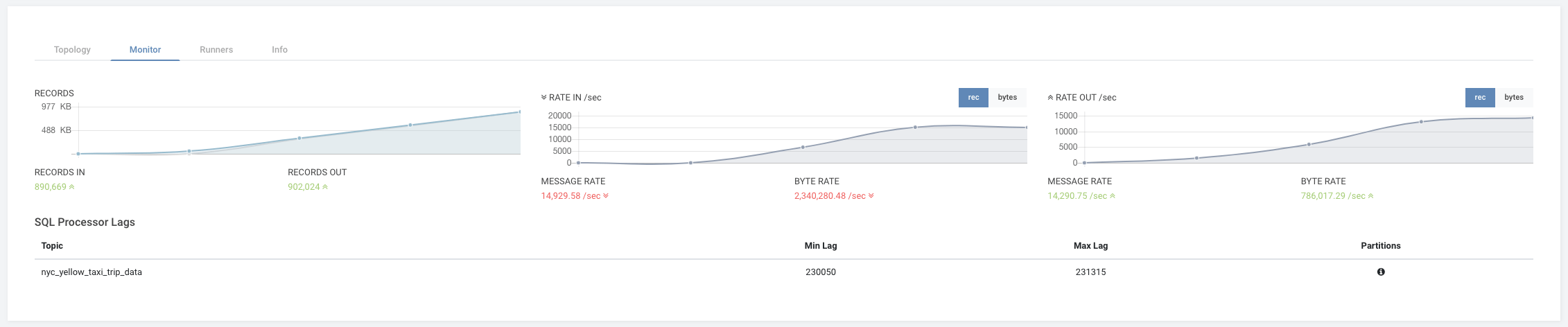
**Monitoring**
Each SQL Processor exposes metrics that Lenses picks up out of the box. These are visible from the UI and allow the user to see how a processor performs.